
Deal Closed → Subscription

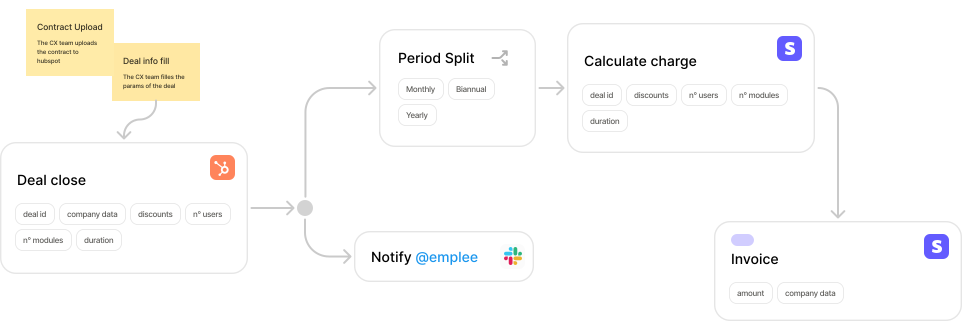
Automatically create Stripe subscriptions when deals close in your CRM. Eliminate manual data entry and reduce time-to-revenue.
Connections
Categories
Manual data re-entry kills momentum. Your sales team closes a deal in HubSpot. Then someone has to manually create the customer and subscription in Stripe—copying data field by field. This takes 20-30 minutes per deal, introduces errors, and delays when customers can actually start using your product.
Statistics
Per deal to manually set up billing
Error rate from manual data entry
Delay in time-to-revenue
Your sales team closes a deal and marks it as "Closed-Won" in HubSpot. The deal includes pricing, products, and billing terms.
NodeBill checks that all required fields are present: customer email, pricing tier, billing frequency, and payment terms. If anything is missing, notify the account owner in Slack.
Check if the customer already exists in Stripe by email. If yes, update their metadata. If no, create a new customer record with company name, email, and HubSpot deal ID.
Create a subscription in Stripe based on the deal terms. Map HubSpot product line items to Stripe price IDs. Set billing cycle anchor, trial period (if applicable), and payment collection method.
Write back the Stripe customer ID and subscription ID to custom fields in HubSpot. This creates a two-way link for future reference.
Post a message in the #revenue-ops Slack channel with deal details, Stripe subscription link, and next steps for the customer success team.
Challenge. Sales team closed 40-50 deals per month. Revenue Operations team spent 15-20 hours manually creating Stripe subscriptions, often delaying onboarding by 2-3 days.
Solution. Implemented this workflow to automatically sync HubSpot deals to Stripe subscriptions within minutes of closing.
- Reduced time-to-revenue from 2-3 days to <1 hour
- Eliminated 15-20 hours/month of manual work
- Zero data entry errors in first 3 months
- RevOps team freed up to focus on strategy instead of data entry
Trigger on deal stage changes and read deal properties
Create customers and subscriptions
Send notifications to team
Link your HubSpot and Stripe accounts in NodeBill. Takes 2 minutes with OAuth.
Tell NodeBill which HubSpot products correspond to which Stripe price IDs. One-time setup.
Click "Use this template" and customize the workflow to match your process. Test with a sandbox deal.
Deploy to production. Your next closed deal will automatically flow to Stripe.
Start with a "test mode" workflow that only processes deals tagged with "NodeBill Test" until you're confident everything works correctly.
Ready to automate your deal-to-billing flow?
Get this template set up in under 30 minutes. Free to try, no credit card required.
Use this template for free