
Payment Failed → Recovery

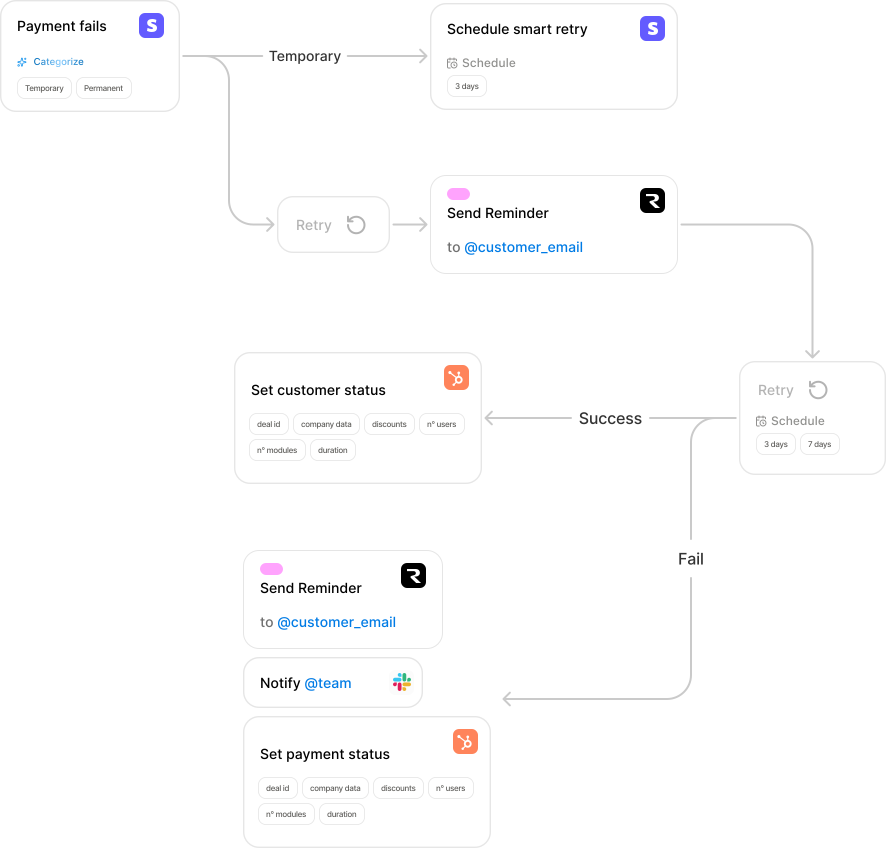
Smart dunning workflow with retry logic and escalation. Recover failed payments automatically and reduce involuntary churn.
Connections
Categories
Involuntary churn is killing your MRR. 20-40% of failed payments are recoverable, but most companies don't have a systematic dunning process. Manual follow-up is inconsistent, often too late, and burns out your team. Meanwhile, good customers churn simply because their card expired.
Statistics
Failed payments are recoverable with proper dunning
Annual MRR lost to involuntary churn (avg SaaS)
Wasted on manual payment follow-up
A subscription payment fails (card declined, insufficient funds, expired card, etc.). Stripe sends a webhook to NodeBill with failure details.
Analyze the failure reason. Is it a temporary issue (insufficient funds) or permanent (card expired, fraud)? Route accordingly.
For temporary failures, schedule a retry in 3 days. Use Stripe Smart Retries which optimize timing based on when the customer typically has funds available.
Send a friendly email to the customer letting them know payment failed and will be retried. Include a link to update their payment method.
If the first retry also fails, escalate the issue. Send a more urgent email and notify the customer success team in Slack with customer context from HubSpot.
Mark the customer as "Payment at Risk" in HubSpot. Create a task for the CSM to reach out personally. Log all payment attempts and customer communication.
Challenge. Experiencing 3-5% monthly involuntary churn. Customer success team manually followed up on failed payments, but response time was inconsistent (3-7 days) and many customers fell through the cracks.
Solution. Implemented automated dunning workflow with smart retries, graduated email escalation, and CSM notification for high-value accounts.
- Recovered 62% of failed payments (up from 35%)
- Reduced involuntary churn from 3.5% to 1.2%
- Saved $180K in annual MRR that would have churned
- CSM team freed up 8 hours/week for proactive customer work
- Average recovery time decreased from 5 days to 48 hours
Listen for payment failures and trigger retries
Update customer status and create CSM tasks
Alert CSM team for high-value accounts
Send dunning emails to customers
Link your Stripe account to receive payment failure webhooks in real-time.
Set up retry intervals and escalation thresholds based on your dunning policy.
Edit the dunning email sequence to match your brand voice and include update payment links.
Connect Slack for CSM alerts on high-value accounts approaching cancellation.
Don't retry immediately. Wait 3-5 days when customers typically have funds. Use Stripe's machine learning to optimize retry timing based on historical patterns.
Don't retry immediately. Wait 3-5 days when customers typically have funds. Use Stripe's machine learning to optimize retry timing based on historical patterns.
Start with a friendly reminder. Escalate tone and urgency over time. Final email should clearly state cancellation date and service impact.
For high-value accounts or after multiple failures, involve the CSM team. Automated alerts in Slack with full customer context from CRM.
Track failure reasons (expired card, insufficient funds, fraud) and adapt messaging. Different problems need different solutions.
Hi [Name],
We tried to process your payment for [Product] but it didn't go through. This happens sometimes!
We'll automatically retry in a few days. If you'd like to update your payment method now, click here: [Link]
No action needed if your card info is up to date.
— The [Company] Team
Hi [Name],
We've tried processing your payment a few times but haven't been able to collect it.
To avoid any interruption to your [Product] service, please update your payment method within the next 7 days: [Link]
Questions? Reply to this email and we'll help you out.
— The [Company] Team
Hi [Name],
This is a final reminder that we haven't been able to process your payment.
If we don't receive payment by [Date], your subscription will be cancelled and you'll lose access to:
• [Feature 1]
• [Feature 2]
• All your data and settings
Update your payment method now to keep your account active: [Link]
Need help? Reply to this email or call us at [Phone].
— The [Company] Team
Stop losing MRR to failed payments
Set up automated dunning in under an hour. Recover more revenue with less manual work.
Use this template for free